
Wallpaper Engine Audio Cutting Out or Fading
If wallpaper sound keeps stopping and starting, check the rule that mutes it when another app plays audio. A screen recorder can trigger that rule even when you are not listening to another app.
Reviewed and updated September 2026

Check the rule that mutes wallpaper sound
- Check whether this option is set to Mute.
- Change it to Keep running, then replay the wallpaper.
- If the cutting out stops, check which music, video or recording app was triggering the mute rule.
Check screen recording and replay tools
Recording software can make Windows report audio activity to Wallpaper Engine. That includes tools that keep recording in the background so you can save a recent gameplay clip.
- Temporarily stop desktop recording or instant replay in the recording app you use.
- Test the same wallpaper again.
- If the problem stops, adjust that recording app or keep the global audio rule on Keep running.
For a rule that ignores only the recording app, use the developer’s application-rule instructions below.
If the wallpaper never makes sound
First try a wallpaper that you know includes music or sound. Many wallpapers are silent, and Audio responsive only means they can react to sound from your PC.
| Where to look | What to check |
|---|---|
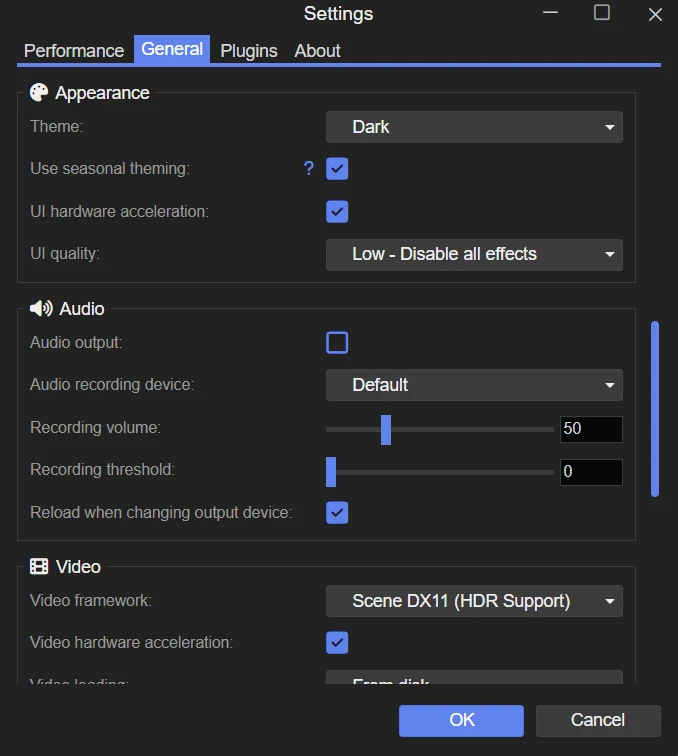
| Wallpaper Engine > Settings > General > Audio | Enable Audio output. |
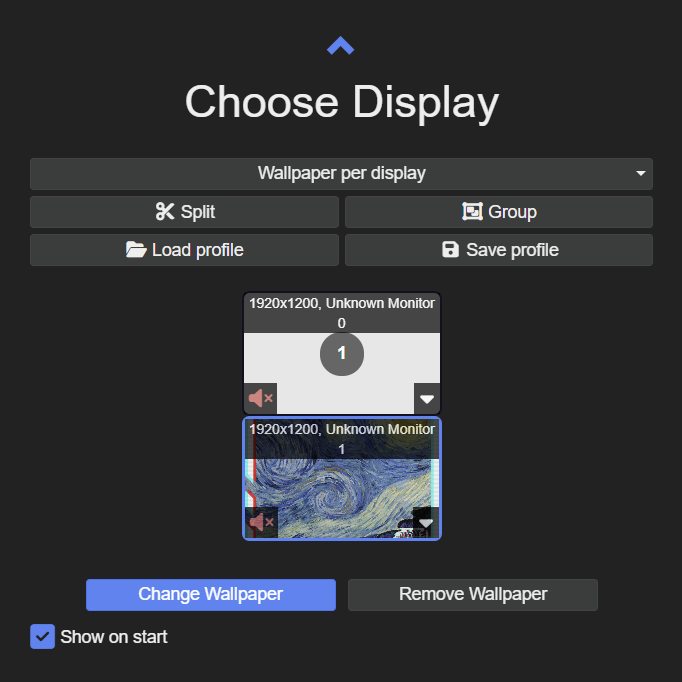
| Wallpaper Engine > Choose display | Unmute the speaker button on the screen playing the wallpaper. |
| Wallpaper Engine > select the wallpaper | Raise its Volume control if one is available. |
If sound disappears after switching headphones
Check that Wallpaper Engine is using the speakers or headphones you want. An app can have its own output device even when Windows’ main output is correct.
If reconnecting USB or Bluetooth headphones leaves Wallpaper Engine silent, restart the app after checking the device. Windows does not always switch the output correctly for an app that is already running.
If the animation stops too
Check Wallpaper Engine’s Performance settings for rules that pause or stop the whole wallpaper. Pause and Stop rules affect animation as well as sound.